
№ 225 / Image transformation
Photograph to graphite study
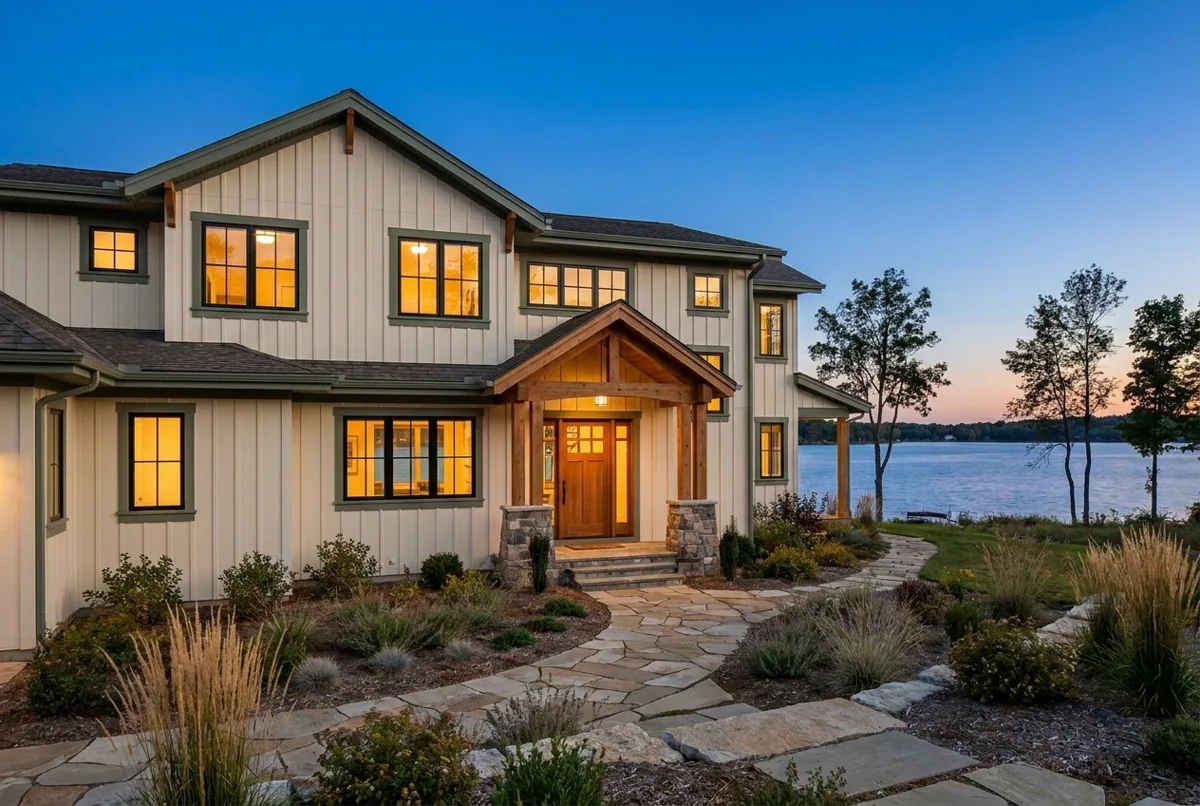
Local contrast picks out rooflines and mullions as a graphite illustration.
IN EVERYDAY WORDS
Local contrast picks out rooflines and mullions as a graphite illustration. Draw the structure while inspecting the demonstration home exterior.
The look
Photograph → Graphite edges. Local contrast picks out rooflines and mullions as a graphite illustration. Keep the listing photograph as the visual subject.
Say this to a designer
On my listing photograph, draw the structure while inspecting the demonstration home exterior. Show “Photograph” and “Graphite edges”. Local contrast picks out rooflines and mullions as a graphite illustration.
Direct the motion
These are starting points, not fixed rules. Match the timing to the content and the person using it.
- trigger
- The visitor controls “Draw the structure” with touch, pointer or arrow keys.
- entrance
- Begin with the recognizable state “Photograph” in view.
- path
- Photograph → Graphite edges. Local contrast picks out rooflines and mullions as a graphite illustration.
- timing
- Follow the visitor’s input directly. For a replay, traverse the full study in about two seconds.
- easing
- Use linear tracking for scrubbing and a gentle ease at both ends of a timed replay.
- hold
- Hold “Graphite edges” while the viewer inspects the result or opens the brief.
- exit
- Retain the original photograph, its architecture and proportions. Identify every virtual furnishing or illustrative image treatment.
The vocabulary
- Draw the structure
- Local contrast picks out rooflines and mullions as a graphite illustration.
- Reference endpoints
- “Photograph” and “Graphite edges” define the two checkable states of this effect.
Make it fit your project
Good places to use it: listing photograph, image transformation example.
Apply this to the listing photograph when the visitor needs to see the change from “Photograph” to “Graphite edges”.
Watch for: Retain the original photograph, its architecture and proportions. Identify every virtual furnishing or illustrative image treatment.
When motion is off: Show the two named states “Photograph” and “Graphite edges” on demand. Keep automatic movement off.
Implementation and accessibility
- Draw the structure while inspecting the demonstration home exterior.
- Start in “Photograph”. Bind the control “Draw the structure” to one reversible value between zero and one.
- Photograph → Graphite edges. Local contrast picks out rooflines and mullions as a graphite illustration.
- Retain the original photograph, its architecture and proportions. Identify every virtual furnishing or illustrative image treatment.
- Inspect the two endpoints and the midpoint on a narrow touch screen. Verify the result using the keyboard.
- Give “Draw the structure” an accessible name and keyboard controls.
- Expose the before and after descriptions as text.
- Load the active study’s assets on demand. Stop rendering while its stage is off screen.
Give it to your AI
Download the working source and example assets. Match this reference number in the included catalog to its renderer.
Replace [ELEMENT] with the part of your project you want to change. The prompt includes the design brief, motion direction, definitions, and implementation steps.
Read the full prompt
Use AI Acceleration Design Ref #225 (Photograph to graphite study, version 1) on [ELEMENT] in my existing project.

Permanent reference: https://aiacceleration.ai/designrefs/225. This local brief contains the full definition. Inspect my existing stack, component, design tokens and interaction before editing.

Goal: Local contrast picks out rooflines and mullions as a graphite illustration.

DESIGN REF #225 · Photograph to graphite study

In everyday words: Local contrast picks out rooflines and mullions as a graphite illustration. Draw the structure while inspecting the demonstration home exterior.

The look: Photograph → Graphite edges. Local contrast picks out rooflines and mullions as a graphite illustration. Keep the listing photograph as the visual subject.

Say this to a designer:
On my listing photograph, draw the structure while inspecting the demonstration home exterior. Show “Photograph” and “Graphite edges”. Local contrast picks out rooflines and mullions as a graphite illustration.

Motion direction (starting points to adapt):
Trigger: The visitor controls “Draw the structure” with touch, pointer or arrow keys.
Entrance: Begin with the recognizable state “Photograph” in view.
Path: Photograph → Graphite edges. Local contrast picks out rooflines and mullions as a graphite illustration.
Timing: Follow the visitor’s input directly. For a replay, traverse the full study in about two seconds.
Easing: Use linear tracking for scrubbing and a gentle ease at both ends of a timed replay.
Hold: Hold “Graphite edges” while the viewer inspects the result or opens the brief.
Exit: Retain the original photograph, its architecture and proportions. Identify every virtual furnishing or illustrative image treatment.

Design vocabulary:
Draw the structure: Local contrast picks out rooflines and mullions as a graphite illustration.
Reference endpoints: “Photograph” and “Graphite edges” define the two checkable states of this effect.

Reduced motion: Show the two named states “Photograph” and “Graphite edges” on demand. Keep automatic movement off.

Implement:
1. Draw the structure while inspecting the demonstration home exterior.
2. Start in “Photograph”. Bind the control “Draw the structure” to one reversible value between zero and one.
3. Photograph → Graphite edges. Local contrast picks out rooflines and mullions as a graphite illustration.
4. Retain the original photograph, its architecture and proportions. Identify every virtual furnishing or illustrative image treatment.
5. Inspect the two endpoints and the midpoint on a narrow touch screen. Verify the result using the keyboard.

Adapt the reference to my branding and content. Preserve existing functionality and semantic HTML.
Reduced motion: Show the two named states “Photograph” and “Graphite edges” on demand. Keep automatic movement off.
Accessibility: Give “Draw the structure” an accessible name and keyboard controls. Expose the before and after descriptions as text.
Performance: Load the active study’s assets on demand. Stop rendering while its stage is off screen.
Avoid: Retain the original photograph, its architecture and proportions. Identify every virtual furnishing or illustrative image treatment.

Show me the working result, verify keyboard, mobile, loading/error and reduced-motion behavior, and explain any tradeoff. Do not publish or change unrelated elements.
Permanent reference #225 · version 1. Pairs with #273, #003.