
№ 715 / Kinetic caption workshop
Wrap words around a face
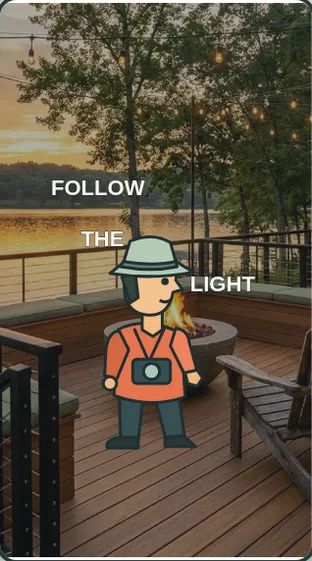
Words move above, beside and below the host. The face stays clear in the center of the finished caption.
IN EVERYDAY WORDS
Start at “Face covered”. Words move above, beside and below the host. The face stays clear in the center of the finished caption.
The look
Words move above, beside and below the host. The face stays clear in the center of the finished caption.
Say this to a designer
On my property story, use “Wrap words around a face”. Words move above, beside and below the host. The face stays clear in the center of the finished caption.
Direct the motion
These are starting points, not fixed rules. Match the timing to the content and the person using it.
- trigger
- Scrub “Wrap words around a face”, replay, or advance with native scrolling.
- entrance
- Establish “Face covered” so the viewer can recognize the starting state.
- path
- Words move above, beside and below the host. The face stays clear in the center of the finished caption.
- timing
- The complete replay takes 3.6 seconds. Keep each cue tied to its position in the sequence.
- easing
- Seek directly to the requested frame. Ease the movement between the authored poses.
- hold
- Settle on “Face clear” so the viewer can inspect the consequence.
- exit
- Carry the discovery source, original question and chosen references into the next scene.
The vocabulary
- Wrap words around a face
- Words move above, beside and below the host. The face stays clear in the center of the finished caption.
Make it fit your project
Good places to use it: property story, Kinetic caption workshop.
Use this when the viewer needs to follow the change from “Face covered” to “Face clear”.
Watch for: Keep the subject, orientation and interface legible throughout the change.
When motion is off: Choose “Face covered” or “Face clear” to inspect either still. Keep the full description available with motion off.
Implementation and accessibility
- Establish “Face covered” using an owned photograph or an illustrative interface.
- Words move above, beside and below the host. The face stays clear in the center of the finished caption.
- Return to “Face clear” using the end control and verify the result at phone size.
- Expose both named endpoints and a keyboard-operated control.
- Give spoken cues a readable visual equivalent.
- Load the active artwork on demand and share its frame calculation between scroll and replay.
Give it to your AI
Download the working source and example assets. Match this reference number in the included catalog to its renderer.
Replace [ELEMENT] with the part of your project you want to change. The prompt includes the design brief, motion direction, definitions, and implementation steps.
Read the full prompt
Use AI Acceleration Design Ref #715 (Wrap words around a face, version 1) on [ELEMENT] in my existing project.

Permanent reference: https://aiacceleration.ai/designrefs/715. This local brief contains the full definition. Inspect my existing stack, component, design tokens and interaction before editing.

Goal: Words move above, beside and below the host. The face stays clear in the center of the finished caption.

DESIGN REF #715 · Wrap words around a face

In everyday words: Start at “Face covered”. Words move above, beside and below the host. The face stays clear in the center of the finished caption.

The look: Words move above, beside and below the host. The face stays clear in the center of the finished caption.

Say this to a designer:
On my property story, use “Wrap words around a face”. Words move above, beside and below the host. The face stays clear in the center of the finished caption.

Motion direction (starting points to adapt):
Trigger: Scrub “Wrap words around a face”, replay, or advance with native scrolling.
Entrance: Establish “Face covered” so the viewer can recognize the starting state.
Path: Words move above, beside and below the host. The face stays clear in the center of the finished caption.
Timing: The complete replay takes 3.6 seconds. Keep each cue tied to its position in the sequence.
Easing: Seek directly to the requested frame. Ease the movement between the authored poses.
Hold: Settle on “Face clear” so the viewer can inspect the consequence.
Exit: Carry the discovery source, original question and chosen references into the next scene.

Design vocabulary:
Wrap words around a face: Words move above, beside and below the host. The face stays clear in the center of the finished caption.

Reduced motion: Choose “Face covered” or “Face clear” to inspect either still. Keep the full description available with motion off.

Implement:
1. Establish “Face covered” using an owned photograph or an illustrative interface.
2. Words move above, beside and below the host. The face stays clear in the center of the finished caption.
3. Return to “Face clear” using the end control and verify the result at phone size.

Adapt the reference to my branding and content. Preserve existing functionality and semantic HTML.
Reduced motion: Choose “Face covered” or “Face clear” to inspect either still. Keep the full description available with motion off.
Accessibility: Expose both named endpoints and a keyboard-operated control. Give spoken cues a readable visual equivalent.
Performance: Load the active artwork on demand and share its frame calculation between scroll and replay.
Avoid: Keep the subject, orientation and interface legible throughout the change.

Show me the working result, verify keyboard, mobile, loading/error and reduced-motion behavior, and explain any tradeoff. Do not publish or change unrelated elements.
Permanent reference #715 · version 1. Pairs with #323, #003.