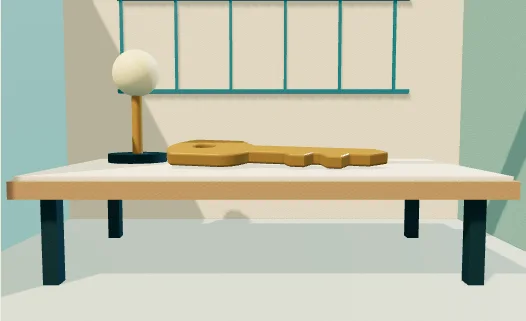
The camera retreats and its lens narrows to hold the center key at a steady size. The rear wall changes scale behind it.
IN EVERYDAY WORDS
Push the camera. Compare the two ends of the control, then replay the change.
The look
The camera retreats and its lens narrows to hold the center key at a steady size. The rear wall changes scale behind it.
Say this to a designer
Apply “A dolly zoom around the key” to my tour transition. The camera retreats and its lens narrows to hold the center key at a steady size. The rear wall changes scale behind it.
Direct the motion
These are starting points, not fixed rules. Match the timing to the content and the person using it.
trigger
Scroll through the study or adjust “Push the camera” directly.
entrance
Begin with the identifiable state “Wide room”.
path
The camera retreats and its lens narrows to hold the center key at a steady size. The rear wall changes scale behind it.
timing
Scrub to inspect the change, then use replay to see the sequence in time.
easing
Match the illustrated motion. Keep manual seeking directly coupled to the control.
hold
Hold the resolved state “Compressed room” long enough to inspect its defining detail.
exit
Carry the subject into the next exhibit and keep the saved project selection.
The vocabulary
Camera continuity
A landmark or a direction of travel connects two different views.
Make it fit your project
Good places to use it: tour transition.
Use this reference to recreate the change from “Wide room” to “Compressed room”.
Watch for: Keep the primary subject and its original meaning recognizable throughout the change.
When motion is off: Select “Wide room” or “Compressed room” to inspect a still state. The same control works from the keyboard.
Implementation and accessibility
Use “Push the camera” to move from “Wide room” to “Compressed room”.
The camera retreats and its lens narrows to hold the center key at a steady size. The rear wall changes scale behind it.
Check the beginning, midpoint and end at phone size. Replay the result and reverse the control.
Give the control a persistent name. Provide both endpoint descriptions and a keyboard equivalent.
Mount the active study on demand and release it after the visitor leaves.
Replace [ELEMENT] with the part of your project you want to change. The prompt includes the design brief, motion direction, definitions, and implementation steps.
Read the full prompt
Use AI Acceleration Design Ref #335 (A dolly zoom around the key, version 1) on [ELEMENT] in my existing project.

Permanent reference: https://aiacceleration.ai/designrefs/335. This local brief contains the full definition. Inspect my existing stack, component, design tokens and interaction before editing.

Goal: The camera retreats and its lens narrows to hold the center key at a steady size. The rear wall changes scale behind it.

DESIGN REF #335 · A dolly zoom around the key

In everyday words: Push the camera. Compare the two ends of the control, then replay the change.

The look: The camera retreats and its lens narrows to hold the center key at a steady size. The rear wall changes scale behind it.

Say this to a designer:
Apply “A dolly zoom around the key” to my tour transition. The camera retreats and its lens narrows to hold the center key at a steady size. The rear wall changes scale behind it.

Motion direction (starting points to adapt):
Trigger: Scroll through the study or adjust “Push the camera” directly.
Entrance: Begin with the identifiable state “Wide room”.
Path: The camera retreats and its lens narrows to hold the center key at a steady size. The rear wall changes scale behind it.
Timing: Scrub to inspect the change, then use replay to see the sequence in time.
Easing: Match the illustrated motion. Keep manual seeking directly coupled to the control.
Hold: Hold the resolved state “Compressed room” long enough to inspect its defining detail.
Exit: Carry the subject into the next exhibit and keep the saved project selection.

Design vocabulary:
Camera continuity: A landmark or a direction of travel connects two different views.

Reduced motion: Select “Wide room” or “Compressed room” to inspect a still state. The same control works from the keyboard.

Implement:
1. Use “Push the camera” to move from “Wide room” to “Compressed room”.
2. The camera retreats and its lens narrows to hold the center key at a steady size. The rear wall changes scale behind it.
3. Check the beginning, midpoint and end at phone size. Replay the result and reverse the control.

Adapt the reference to my branding and content. Preserve existing functionality and semantic HTML.
Reduced motion: Select “Wide room” or “Compressed room” to inspect a still state. The same control works from the keyboard.
Accessibility: Give the control a persistent name. Provide both endpoint descriptions and a keyboard equivalent.
Performance: Mount the active study on demand and release it after the visitor leaves.
Avoid: Keep the primary subject and its original meaning recognizable throughout the change.

Show me the working result, verify keyboard, mobile, loading/error and reduced-motion behavior, and explain any tradeoff. Do not publish or change unrelated elements.
Permanent reference #335 · version 1. Pairs with #004, #006.