01
Room use
Name the actual function the image should make legible.
Free foundation-model playbook
A room-preserving workflow for agents, teams, photographers, and FSBO sellers using the image tools already available inside major foundation-model products.
What “fast” means here
Fewer uncontrolled revisions: one clean source image, one explicit room brief, one model, one verification checklist.
Empty room to staged draft
This film uses controlled fictional rooms generated for the guide. The before frame controls the architecture. The after frame adds only movable furniture and decor. The second direction shows how client preferences can change the presentation without changing the property.
Silent 18-second Remotion film. An empty living room becomes a staged draft, the same room receives two client style directions, an empty bedroom becomes staged, and the film closes with Prompt, Compare, Disclose. Controlled fictional demonstration; AI-generated rooms are not customer work or model-performance proof.
Treat this as one connected operating system: capture an honest source with the source-photography guide, build the property locks and client direction in the prompt library, run the edit in the model playbook you choose, compare both files with the quality-control gate, then package the accepted draft with the disclosure and record system. FSBO sellers can continue into the owner publishing workflow. Agents can turn the verified evidence pair into a source-led content bundle and a citable SEO/GEO page.
Interactive Remotion player built from the same room evidence. Product interfaces change, so the film teaches the durable workflow instead of imitating a temporary chat screen.
Use the highest-resolution original. Correct exposure and verticals first, but do not erase property condition.
Name the room use, listing position, style direction, must-preserve features, furniture limits, and anything the model must not obscure.
Upload the original and use the master prompt. Change one variable per revision so you can see what improved or drifted.
Check geometry, permanent features, material colors, exterior views, defects, furniture scale, shadows, and reflections.
Keep the untouched original beside the staged version. Use predictable names so the disclosure and review chain survives handoffs.
Label the image as virtually staged in the image or caption and follow the relevant MLS, platform, brokerage, and local rules.
Worked visual example
Use the empty frame as the truth source. Then inspect the staged draft edge by edge. A persuasive picture still fails if a window, doorway, floor line, fixture, or exterior view moved.
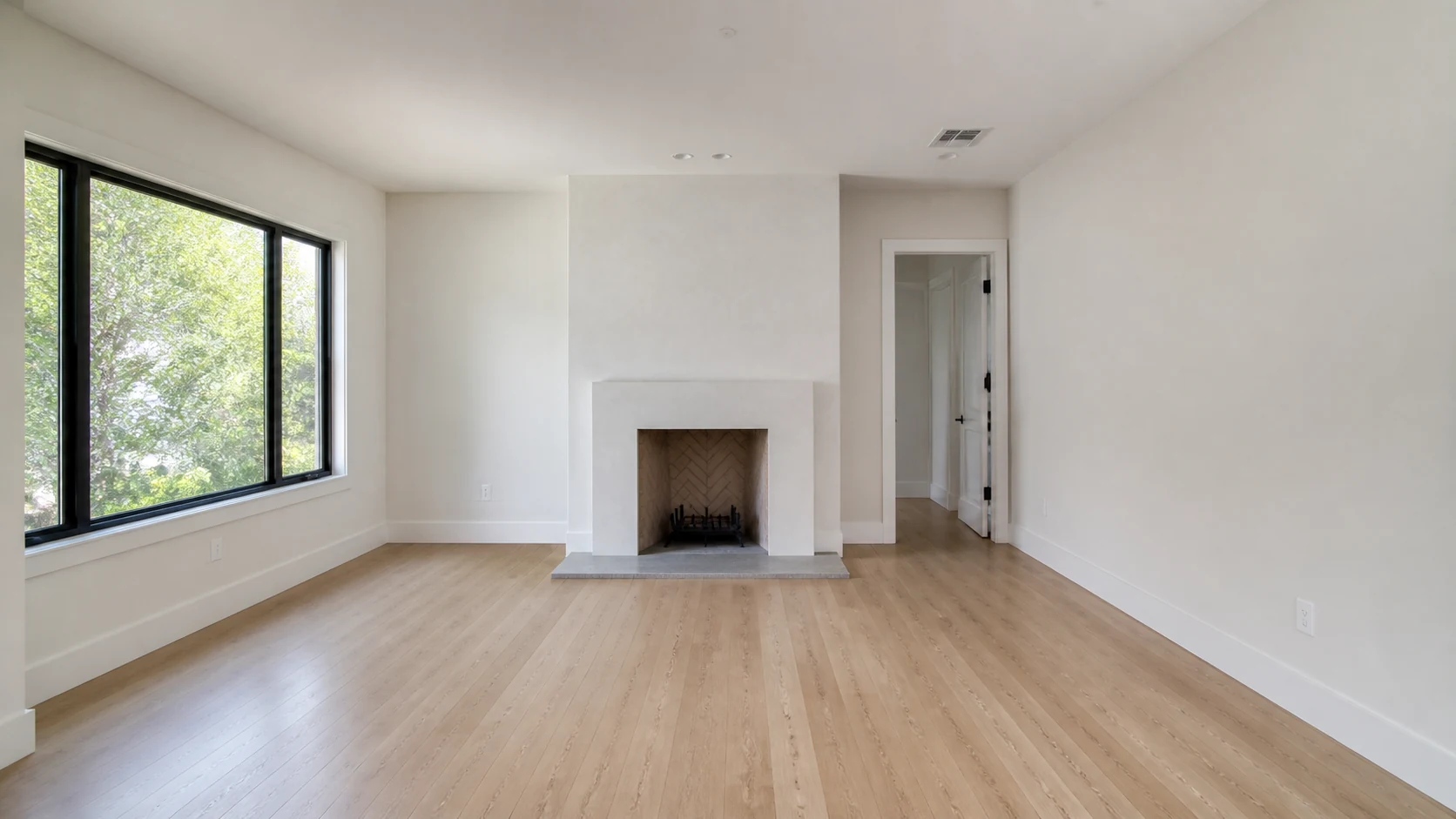
Before — original empty room
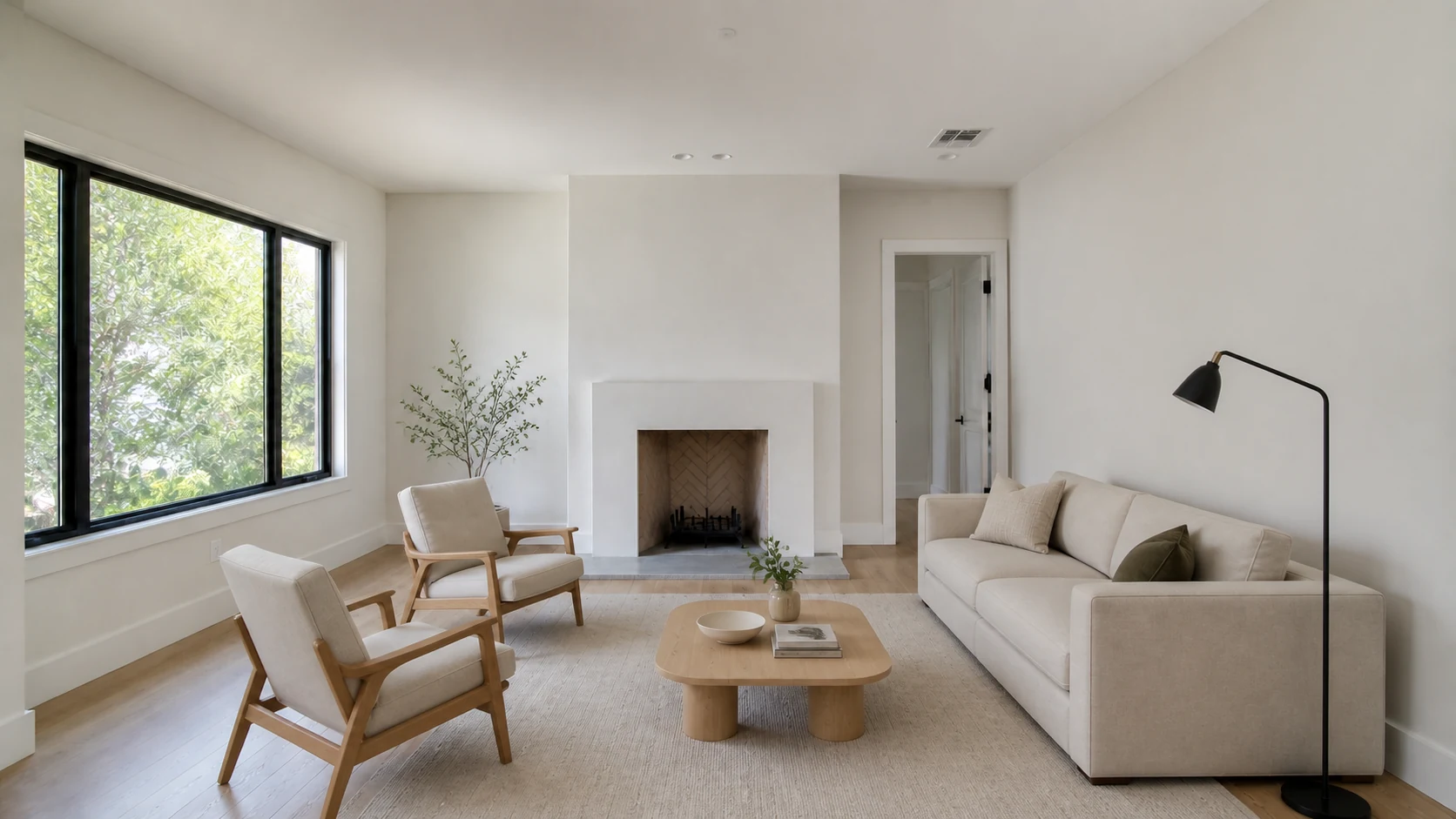
After — virtually staged draft
Client customization brief
Approve these fields before generation. The model can change furniture, decor, density, and style direction. It cannot change architecture, condition, scale, or who the housing is for.
01
Name the actual function the image should make legible.
02
Entry, mid-market, premium, rental, or FSBO context.
03
Choose one clear direction, not a mood-board pile.
04
Minimal, balanced, or fuller, with a clear circulation path.
05
List camera, geometry, fixtures, materials, view, light, and condition.
06
Use design and property context. Never protected-class assumptions.
Copy, customize, verify
Room-preserving master prompt
You are editing a real-estate listing photo.

GOAL
Virtually stage this exact empty [ROOM TYPE] in a [STYLE] style for this [LISTING POSITION + ROOM USE]. Do not infer or target protected classes.

PRESERVE EXACTLY
- camera position, focal length, crop, perspective, and room proportions
- walls, windows, doors, trim, ceiling, flooring, built-ins, outlets, vents, and permanent fixtures
- the exterior view, natural light direction, and existing material colors

ADD ONLY
- movable, realistically scaled furniture and restrained decor
- a clear walking path and a layout appropriate to the room's actual use
- natural shadows and reflections consistent with the original light

DO NOT
- renovate, repair, widen, remove, or add architectural features
- hide damage or defects
- add text, logos, people, pets, or impossible views

OUTPUT
One photorealistic listing image at the original aspect ratio. No commentary.
Image editing inside Gemini Apps, including uploaded reference images.
Open playbook →Create and edit with ChatGPT Images; use selective edits for controlled revisions.
Open playbook →Generate or edit through Grok Imagine; keep iterations tightly constrained.
Open playbook →Use Claude to inspect, brief, and QA images; use another tool for the actual render.
Open playbook →Free download
Room brief, first-pass prompt, correction prompts, and a negative-constraint block.
Download .txt ↓Free download
Room use, listing position, style direction, furniture density, property locks, approval, and do-not-infer rule.
Download .txt ↓Free download
A line-by-line comparison gate for property facts, geometry, defects, and disclosure.
Download .txt ↓Free download
A simple original/staged/revision naming scheme for clean handoffs and auditability.
Download .txt ↓Free download
The complete silent 9:16 room-transformation film for social or team training. Keep the disclosure frame intact.
Download .txt ↓Free download
Accessible text for every on-screen teaching beat and disclosure in the 18-second film.
Download .txt ↓The FSBO edition adds shot selection, a room-use brief, publishing checks, and a disclosure script.
Open the FSBO playbook →Photo capture, disclosure, publishing checks, and a small-office example.
Open standalone guide →Upload, edit, correct one region, and run a property-accuracy gate.
Open standalone guide →Reference-image editing, explicit locks, and controlled revisions.
Open standalone guide →Capture honest, stageable phone photos and keep the originals.
Open standalone guide →Copy the property-lock and focused-correction system.
Open standalone guide →Compare geometry, condition, furniture physics, and artifacts.
Open standalone guide →Package the accurate edit with labels, provenance, and local-rule checks.
Open standalone guide →Research sources
Advertising claims must be truthful, non-deceptive, and evidence-based.
Official Fair Housing guidance for housing advertising that uses digital and automated systems.
First-party guidance for image context, quality, alt text, and discoverability.
Risk-management guidance supporting human review, tracking, and documentation for generative AI work.
Product access, limits, local listing rules, platform policies, and laws can change. Re-check the linked authority before important or public work.
Keep building
AI Acceleration: Real Estate is a private, self-directed curriculum for practical AI work across content, communication, lead follow-up, CRM, client research, operations, and relationship management. Build it. Review it. Keep what works.
Explore the Skool community ↗Follow Ryan + AI Acceleration
No ranking, revenue, closing, or time-saving promise. The classes teach the work and the review systems around it.