Read the edited lesson transcript
Edited teaching transcript from the exact lesson caption source. Non-contiguous passages omit personal details, unsupported claims and changing tool or policy advice. The original video is unchanged; use the current practice instructions above.
0:00 · The copy and paste problem
Watch this sectionSo if you say get me ready for Thursday's listing appointment and it has all of these. You can either use AI to like build human connection or destroy it. This is snapping together basically how to use connectors to go from chatbots to real work and so this is going to go over kind of how to go from basically stuck in the chat bot app to actually having the chat accomplish real things for your business. So the goal today is to leave with some discernible idea of what your ecosystem is because without knowing what resources you have in it.
It's very difficult to actually get them deployed effectively and going in the same direction. The goal is to just kind of understand connectors, walk through what they are, how they kind of help actually get business done and then figuring out what an actual task looks like and how to actually map those out so that you can actually start automating them. So there's three prompts that we're going to go over today. One of them is going to be capture. So how do you capture your ecosystem? How do you connect it?
And then how do you design workflows so that you can just keep reusing those tools over and over and over again. So how do we go from nothing to creating something that's more capable? So the thing that's missing from the most useful outputs is your personal context, right? So this could be you could use Gmail, you could use Outlook, you could use Yahoo, you could use AOL or you could whatever it is that you use for your email. Same for your calendar, same for your cloud storage, same for your CRM.
These are completely replaceable to whatever your ecosystem is. And so what we have to do is once we connect all of these, it gives your AI much better context. So if you say, get me ready for Thursday's listing appointment and it has all of these. And so if it's got all these things, it's going to prepare you much more effectively for that meeting. And so one of the things that I always talk about is you can either use AI to like build human connection or destroy it.
And so it gives you the ability to connect much more effectively. And so another example here is just, you know, what do I need for my two o'clock and the AI is often going to give you a generalized like, hey, this is what, you know, afternoon meetings often will need. It's getting much better at pulling from context just at baseline. But if you don't have the calendar and Gmail as kind of the two biggest things probably or wherever your clients are communicating with you at, you're probably missing out on their latest context, right?
Because context is very dynamic. So a lot of people think they set it up once and they're good to go. But typically you set it up and then things will be added as the deals progress, like, oh, I don't want something that has a bunch of steps. I want something in the school district. Like as the sale or the relationship progresses, more and more context. And if you have these things connected, it'll add automatically versus you being like, oh, I need to go to my context card and add X, Y, and Z.
4:10 · What a connector can access
Watch this sectionSo connectors basically provide a key to a door so that your AI can access your tools, right? So the goal of the AI is to have access to the right information at the right time. So you don't want to pull in, like as an example, this would be poorly set up if you asked a question about your email and it pulled in all of your emails to answer that question, right? So you go through, find the email that you're talking about and have that be the only data that goes into the AI.
And so that's what a connector, a plugin, that kind of stuff does is it gives you a more secure way to connect with that data and give you kind of that gateway to more information. So each one calls it something a little bit different for some reason. So your brokerage, your agency, your typically whatever it is that's above you will have some type of either like restrictions, like as an example on the Outlook account, like stuff like that, oftentimes there will be things that are like, hey, we don't want client data going into here.
So here are rules to prevent that. So just understand that whichever your brokerage or agency is, if you need access to the tools you may have to ask an admin and just verify security, all that kind of stuff.
5:48 · Build one recurring task
Watch this sectionSo every task is a build. So breaking the task down into their component steps and then understanding what tools need to stack on top of those steps, right? So this is basically how you would solve for any workflow is you would say, like let's say you want to write a custom listing appointment for someone who sent you an email. You would grab that email, step one. You would pull any context from the web as step two and you just kind of build out like how would you do it yourself?
And then you're giving those instructions to an AI with the tools to do the job. So we're trying to give it real tools to do real work. And so as an example, Thomas Edison has a listing appointment on Thursday. So he's going to find the seller's email. He's going to check what they want. He's going to look the seller up. He's going to pull the property facts. He's going to pull comps. He's going to check the drive time. He's going to build the packet and he is going to come to the appointment, walk in ready.
So these are the plans that he's kind of mapped out for this workflow. Then what we need to do is we need to stack the tools on top of that workflow so the AI can do the workflow for you, right? You're not sitting there telling the workflow, do this step, do this step, do this step. You're drawing a map of where the work actually lives and pointing the intelligence at it
7:14 · Sources and human decisions
Watch this sectionin that way. So the next step that you're going to do is you are going to figure out where you need to be in the process because there still is some level of human oversight that needs to happen within these workflows, right? And so this is something that can be automated out. But as an example, you would pull whatever MLS you use in and it would be your judgment is did it pull the right comps? Are these comps the right comps for this particular property, right?
And as you give your system better parameters, better parameters, the likelihood that you need to apply your judgment starts going down, right? Because it has better examples, better examples and you're like, okay, like now it's now it's rock and roll in. So once it builds the packet, it's up to the human to approve it, right? You want to make sure you're looking at everything, making sure nothing's in violation of fair housing, making sure everything is moving at the information's accurate. Because once the deliverable goes out to the client, you're either showing them how valuable the deliverable is or you're trying to make up for the mistakes that the deliverable has in it, right?
And so if you use crappy AI and get crappy outputs, you're going to be spending time repairing that relationship versus, hey, this is a really great asset. Here's how we can use it to move everything forward, right? And so I always recommend human in the loop before something gets ready to send. And then it's still your job to build the relationship, whatever that looks like. And it's likely going to still be your job to end up with a signature for the deal or for moving forward or whatever it is that needs to happen, right?
And so you always want to figure out like, where am I required to be in this workflow? And then you kind of push everything out around it. So then you plug it in and the AI goes from thing to thing to thing, kind of down the chain, getting to your decision points. And so the goal is to go from step one to step four as fast as possible so that you can evaluate in step five. And so you can complete the chain and give them their deliverable as soon as possible.
And if it's all hooked up and everything has the right tools, it'll do the work, pass the work to the next step, do the work, pass the work to the next step. And that's what we're looking to do. And so as an example, here are a couple very simple workflows that you can build right inside either ChatGPT, Claude, whichever one you want. But basically, if you connect your calendar and your email, you can have it automate a morning report or an evening report for you that details what came through my Gmail, what was my account, what do my calendar look like, give me a recap for the day or help me map out my day, whatever it is that how you kind of operate.
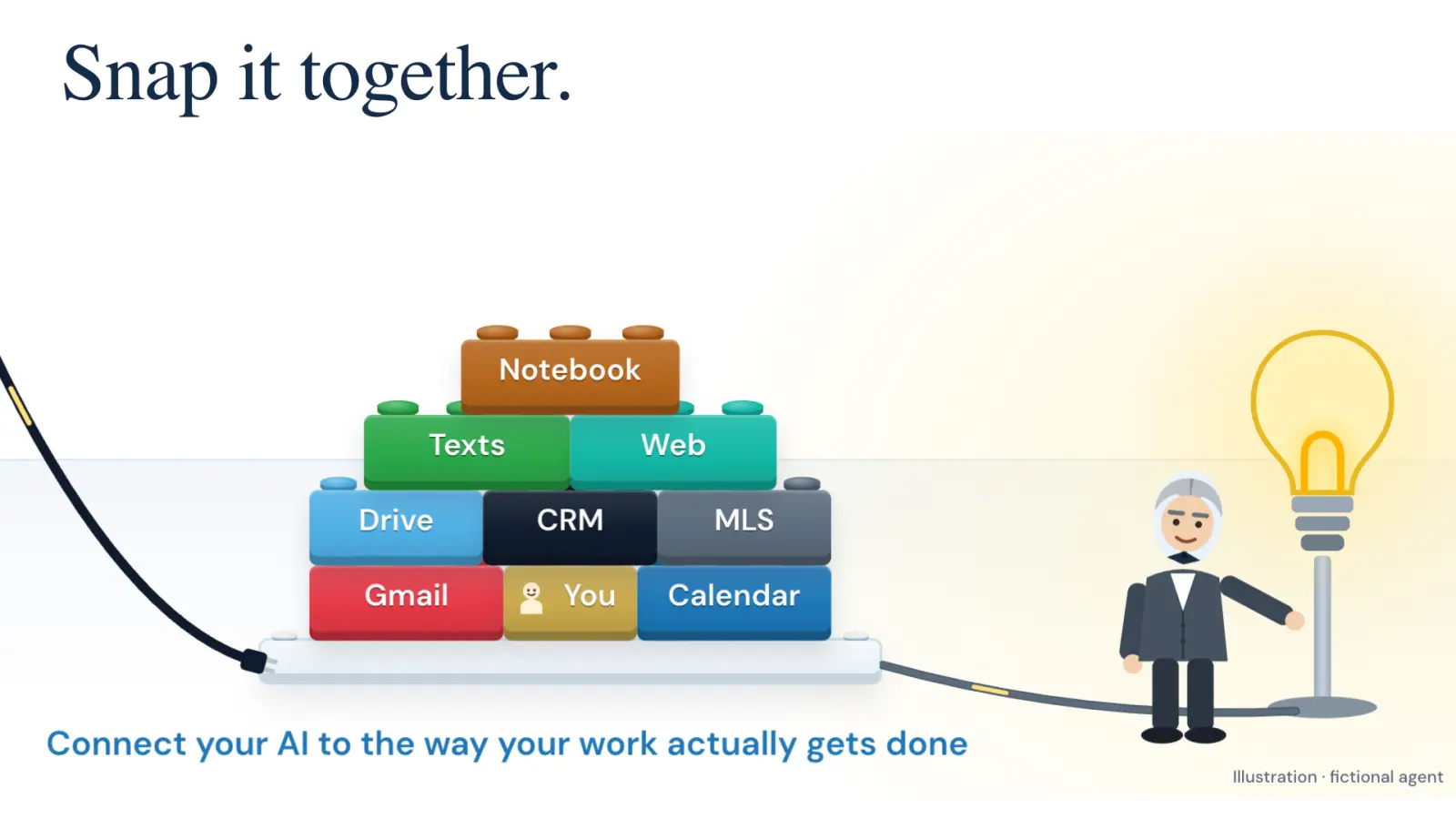
I like to map out my day the night before. So I will have something like this run the evening before and have something prepared for me in the morning. Some people run this in the morning. They get their intelligence that way and that's totally fine. I have done both, I do prefer the evening. Again listing prep, right, getting a little bit more complex. Now we need our Gmail, Drive, Calendar, Web Access, MLS that you're using and you to help add any additional context and all that kind of stuff.
And so if you're looking to build something for listing prep, you want, how is the buyer, the seller, the client communicating with you? What is their storage of files? What is the calendar that you've coordinated with them? What is the kind of web? So the Zillow listing, the home that you're looking at, anything like that, any MLS access and then obviously, again, you have the full context. But the point for this is the more relevant things you can put together, the more kind of complex your workflows and the more prepared you can be for those listings and kind of those human interactions.
And then follow up as well. So again, Calendar Gmail is one of the more powerful combos. You review it and if it looks good to you, go ahead and send it, right? So again, we're trying to make the administrative part of the job as hands-free as possible because the stuff that you guys are highest value at is like while sending the email is physically important, actually writing the email and having that information, I feel like it's less important for you to write the email than to care about your client, right?
If you care about your client, you're going to read the email and be like, "Okay, this is empathetic. This meets what they need." Versus there are going to be people who write better emails but don't care as much. They just want the deal, the deal, the deal, right? And so if you're actually caring about your clients, having these tools set up makes it much easier to represent that you care about the clients. So something that is also super useful, you'll notice is the morning brief, the listing prep, the post showing, they all use the same connectors that we've connected for a different reason, right?
And so once the connector is connected, it becomes a Lego block that you can put onto any workflow that you want. So as you're building workflows, you can think, "Oh, I've got a Gmail connector, I've got a calendar, so I don't need to do anything with those. I'm already ready to roll," right? And so like it's kind of like my kids in their toy box, right? Like you go to the toy box, you figure out what activity you're doing, you get out the toys for that activity and then you set it up and hopefully it works and then when it doesn't, you go get the Ninja Turtle from the toy box and you beat everyone up, right?
So like that is the goal. And you want some rules in place, so you want things like read only access for things that you don't want to have send access to, like if you know that there's like this is always sensitive information coming into this, I never want it to be able to send anything. There's ways that you can add read only access so it can see the information but it can't impact the information at all. Some people set their CRMs up that way where it can go and it can see the whole CRM but it can't delete entries, it can't edit, it can't do those kinds of things.
15:04 · Read before acting
Watch this sectionI always like to make sure that the AI is reading before it's acting. So I always have a research phase before the AI just goes out and does things. I also try to stop any customer facing communication before it goes out so that I can read it just to validate. So I always try to have it draft and not send for customer facing. And then another thing are something called traces or observability. So figuring out, okay, what sources did the AI actually go to or did it just make that thing up?
Did it guess right or did it get good information? Is guessing right is okay sometimes but when there's critical pieces of information, you want to be able to validate that it's actually going and getting the information, not hopefully getting it right from time to time.
16:15 · Map, connect and check
Watch this sectionSo drill number one is going to be to figure out what your ecosystem is. So like do you use OneDrive, do you use Google Drive, do you use Gmail, Outlook, messages, all that, where is your data coming in from, what resources do you have to kind of build these tasks and workflows? Drill number two is connecting and checking. So one thing we want to do is we want to connect the plug-in, the connector, whatever it is, but then we also want to test to make sure that it's actually connected and functioning.
And the way we do that is we ask it a question about something within that connector that it would only be able to know if it actually called the tool and brought that information into the AI, right? So you don't want to ask it like what is my email, you want to say tell me what email came in at 2 p.m. on Tuesday and what was the key topic of it, right? And so then it's going to go, it's going to find that email and it's going to give you a summary of it so that you know, okay, it went in, it found the email and then it produced something that it would not have been able to do without actually going in and getting the information.
And then the last thing is to design your own workflow. So to figure out like when I sit down for work, what are the steps that I take from A to Z, what resources do I go into, like what buttons do I click to make work happen, right? Like do I go into Gmail and then I see the email and then I capture this information from the email and then I go into the Compass website and I do this research and then I take that research and you're just kind of mapping out like, what are you guys doing for clients so that you can start feeding that process to the AI so that it can start being the thing that's like, instead of you sitting there and doing the work, you kick off the process, do something else that you want to do for your business and then come
back and check on the process to see if it got you the output you want, right? Like that is the real goal of this and then something that you'll realize like as you're building these systems, you may have a brick that you didn't know so like maybe there's like a public record, like maybe you go to the like property tax website to check public records and that's something that you need to create a process for. You want to identify the things that you will never hand off to an AI, at least you would never hand off to an AI in the state that AI is in right now, right?
Because AI will get better and there's likely more and more things that you'll be willing to hand off but as of right now, like what are the kind of things that you're the key stakeholder on and you're not willing to turn that over to the AI? And then connectors, so just think about kind of how work it's done for you and what connectors you can add so it could be a CRM, it could be a communication tool, it could be calendar, whatever it is.
19:18 · Try a recurring workflow
Watch this sectionAnd then the biggest goal I would have for you guys this week is to build some small workflow even if it's just like a morning report of your calendar and email that gives you some type of information that you can run on like a semi automated basis. So try to think about like what is something that would be really useful if it was running on repeat, that's maybe something that just gives me information that would be able to help some element of my work and save me time, right?
And so think about things that you want to run, and this could even be like, "Oh, I go and I check the tax list every four days for records or I check this lead source every four days for records or I go and I look at this real estate forum for updates on this topic. It's just something that you have an interest in more information in. Yeah, honestly, the thing that I would recommend is running that first prompt and like capturing your ecosystem, connecting what needs connected, and then trying to map out like, "Okay, this is, like I would literally, like the next time you sit down to do like admin work, I have like a pen and paper and just write like step one as I do this, step two as I do that."
And it's a pain in the ass for like the first couple times you do it, but once you're able to automate out that stuff and you never have to do it again, it's like, "Okay, that was worth it. That was worth it."