75%
of REALTORS® reported using social media in their business.
Survey of 1,241 usable responses; ±2.78% margin of error.
NAR 2025 Technology Survey ↗Google visibility for real-estate agents
Connect your real-estate website and supported social accounts to Search Console. Then track the searches and pages putting your expertise in front of buyers, sellers, and referral partners.
75%
of REALTORS® reported using social media in their business.
Survey of 1,241 usable responses; ±2.78% margin of error.
NAR 2025 Technology Survey ↗39%
named social media as the technology producing their highest number of quality leads.
This is self-reported lead-source perception, not audited attribution.
NAR 2025 Technology Survey ↗4
social platforms currently documented for Search Console platform properties: Instagram, TikTok, X, and YouTube.
The feature is still rolling out, so the option may not appear in every account.
Google Search Console ↗Add a Domain property for all protocols and subdomains. Verify ownership through DNS.
Open Add property, select a supported platform, choose the exact account, and finish the offered ownership check.
Link the exact profiles from the website and point social bios back to the canonical site when permitted.
Use Organization sameAs for company profiles and Person sameAs for Ryan's profiles. Keep the visible copy and markup identical.
Use website properties for site performance and each platform property for that account's performance on Google.
Export dates, pages or posts, impressions, clicks, CTR, and position. Mark rollout gaps as missing data.
Captioned walkthrough 01
This recreated walkthrough follows Google's documented Domain-property flow without exposing a private account, DNS value, or property list. Your interface can vary.
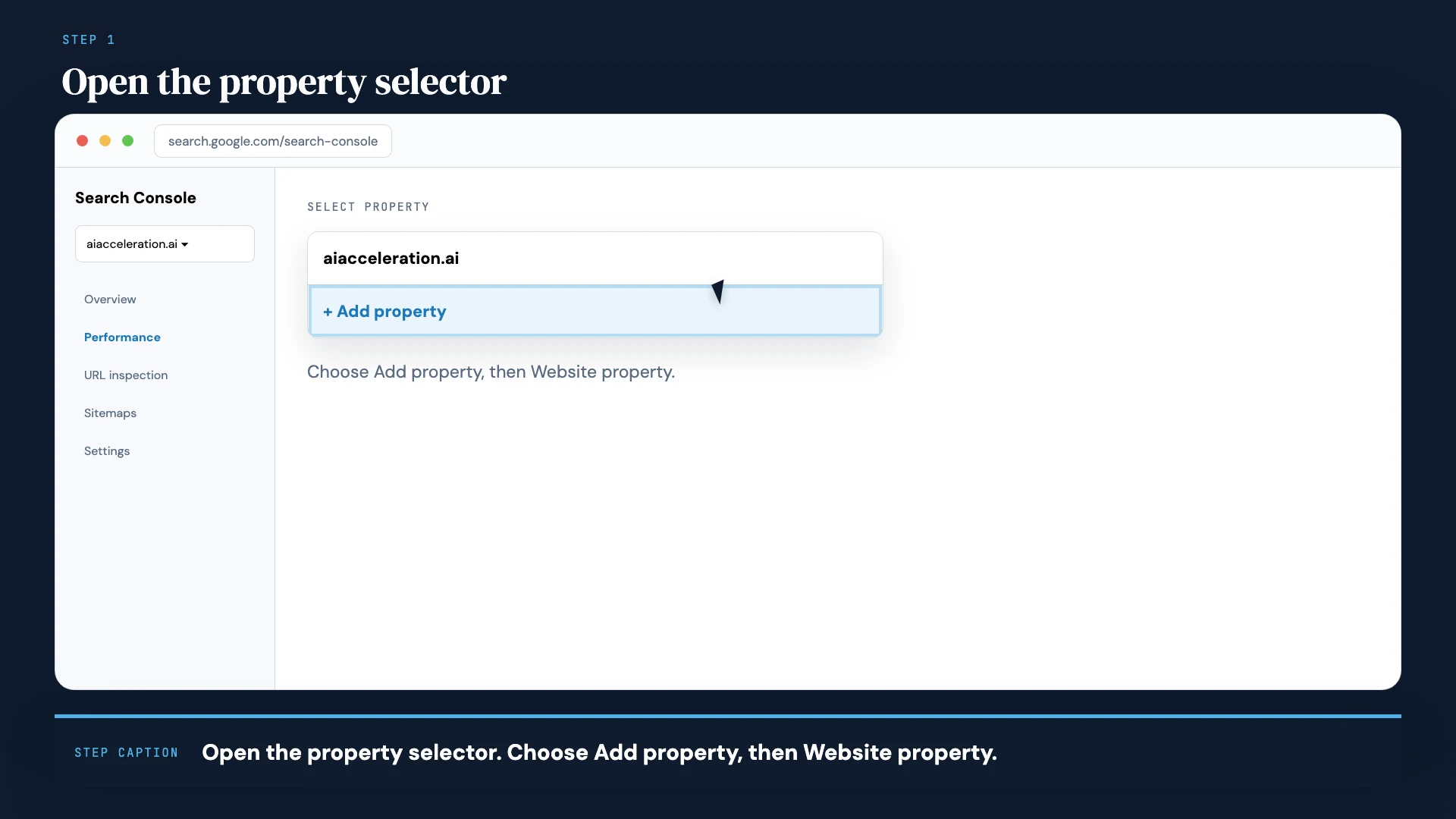
Website · Step 1
Use the property selector. Choose Add property, then Website property.
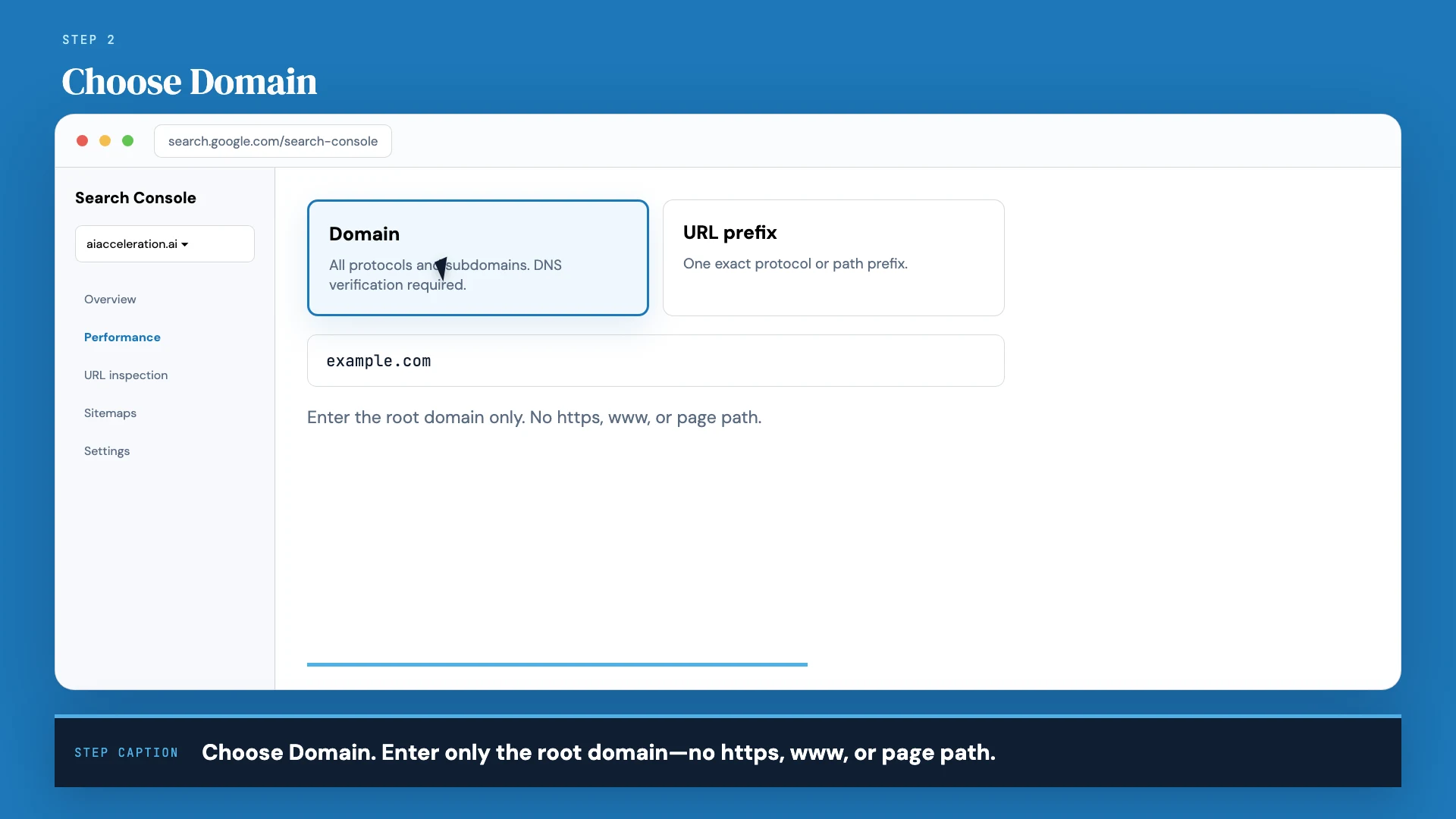
Website · Step 2
Enter the root domain only. Do not include https, www, or a page path.
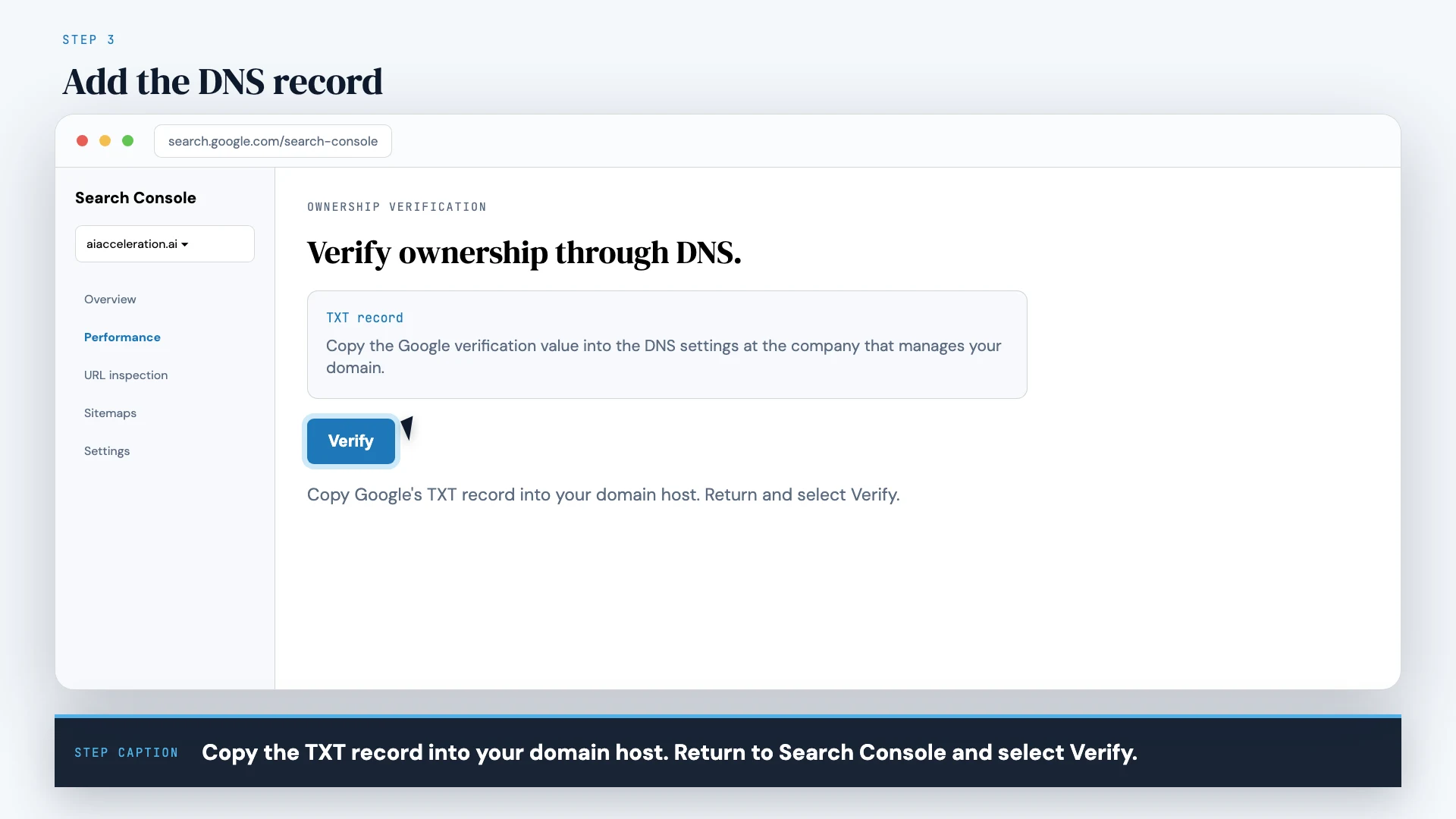
Website · Step 3
Add Google's TXT record at the domain host, return to Search Console, and select Verify.
Captioned walkthrough 02
Repeat the setup for every Instagram, TikTok, X, or YouTube account you manage. If Platform property is missing, the honest status is NOT AVAILABLE YET.
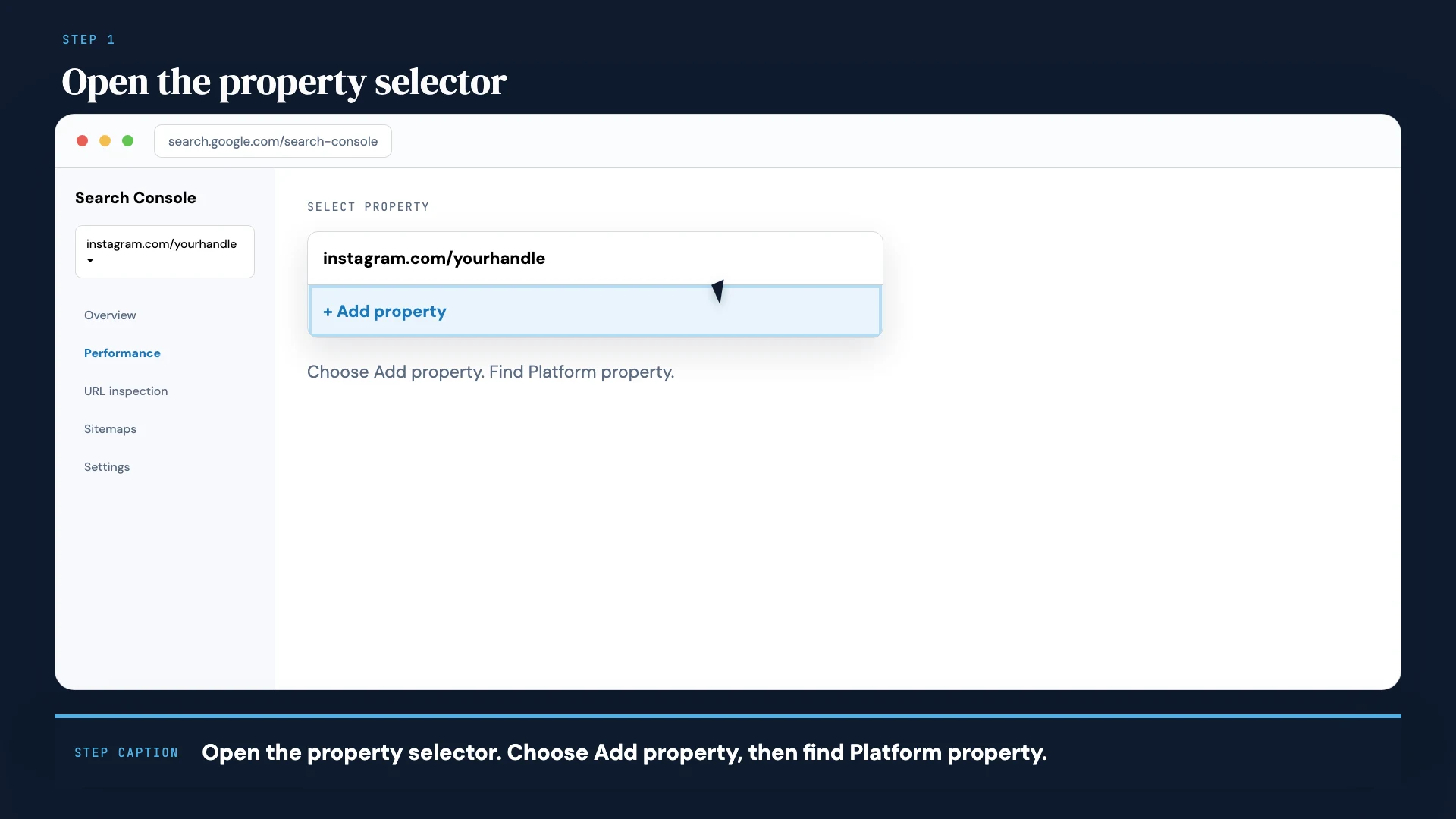
Social · Step 1
Use the same property selector and find the Platform property options.
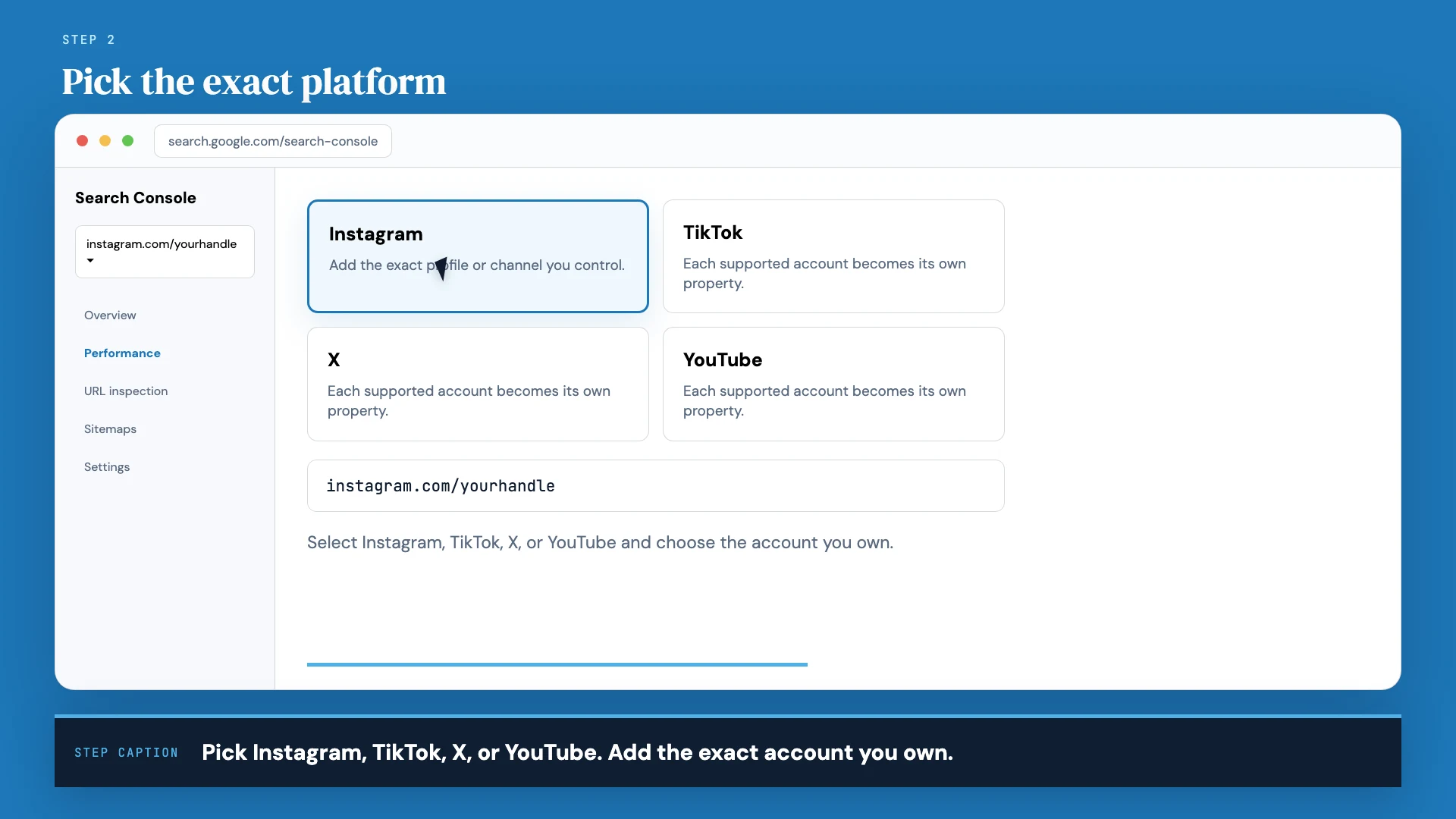
Social · Step 2
Choose Instagram, TikTok, X, or YouTube. Add each account separately.
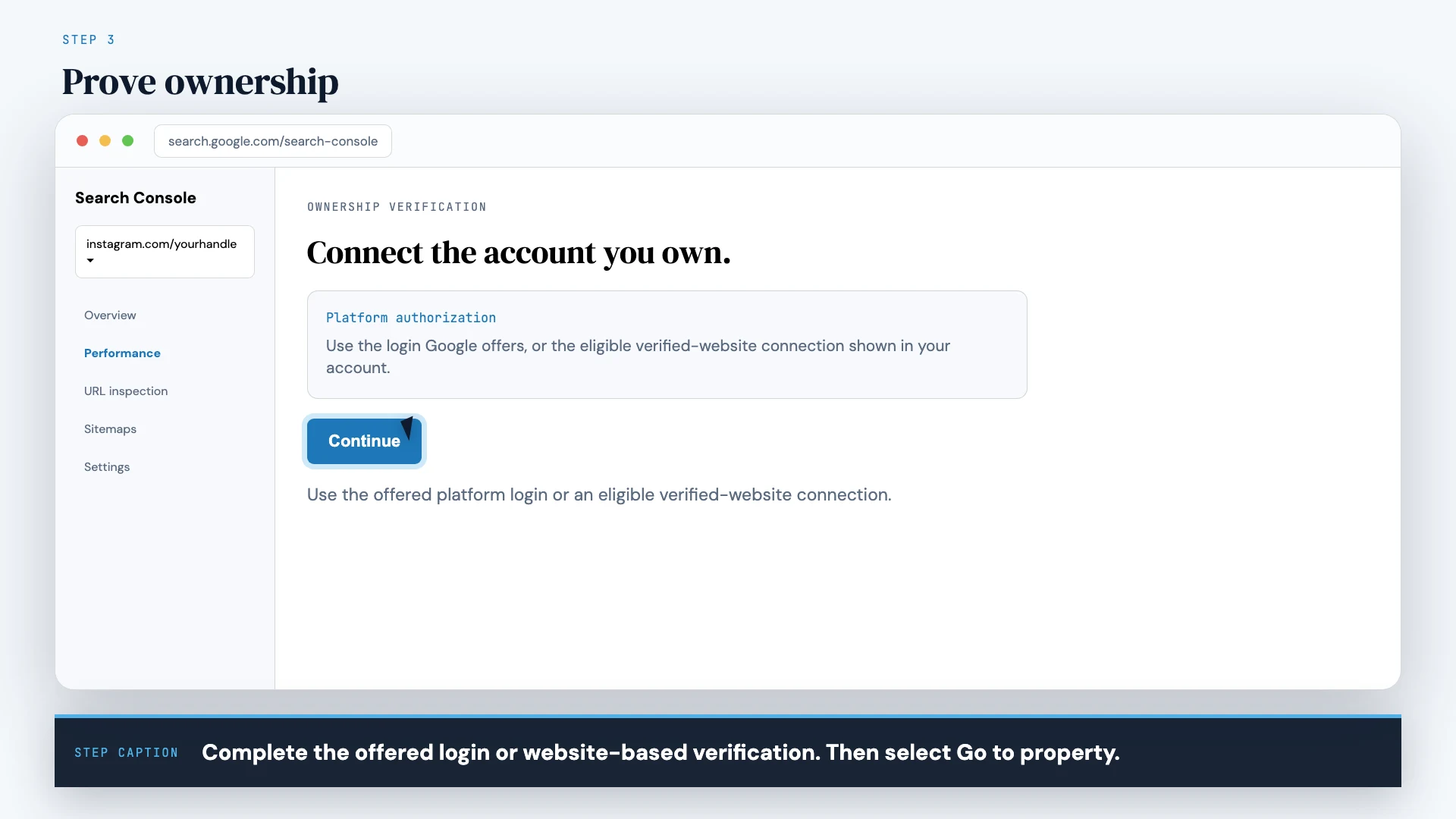
Social · Step 3
Complete the offered login or eligible website connection, then select Go to property.
It adds a reporting property for discovery on Google. It does not merge social analytics into Search Console, create a backlink, or guarantee ranking. Visible profile links, sameAs markup, useful content, earned mentions, and platform properties are separate layers.
Social-search entity auditor
Audit website and social-profile connections for search entity consistency.

WEBSITE PROPERTY
[domain and Search Console verification status]

SOCIAL PROFILES
[exact Instagram, TikTok, X, YouTube, LinkedIn URLs and ownership status]

VISIBLE WEBSITE IDENTITY
[name, founder, description, logo, contact, profile links]

ORGANIZATION / PERSON JSON-LD
[paste]

Return four separate checklists:
1. website property setup
2. Search Console platform property setup for each currently supported/available account
3. visible reciprocal profile links and Organization/Person sameAs consistency
4. Links report and performance monitoring

Mark unavailable rollout features as NOT AVAILABLE YET. Do not claim that sameAs, follower count, profile connection, or social engagement directly improves ranking.
Situation
The website has Ryan and organization profiles in schema, but visitors need visible social links and the team wants platform-level Search reporting.
Useful output
Verified domain property; supported platform properties added as rollout permits; exact LinkedIn/X/Instagram/YouTube links visible; Organization and Person `sameAs` separated correctly.
Completion receipt
Property-list screenshots, verification status, source-controlled schema, rendered social links, structured-data parse, and monthly property export.
Research sources
Official setup steps and reporting boundaries for Instagram, TikTok, X, and YouTube properties. These reports measure discovery on Google, not reach inside the social platform.
Current Search Console instructions, including the gradual rollout of Instagram, TikTok, X, and YouTube platform properties.
NAR survey of 1,241 usable responses. It reports social-media use, lead-generation technology, AI use, adoption goals, and methodology with a ±2.78% margin of error.
First-party documentation for Organization identity fields and social/review profile URLs in `sameAs`.
What Search Console's external and internal link reports include, omit, and help diagnose.
Requested practitioner guidance on the distribution and discovery relationship between social media and web content without treating followers as a direct ranking switch.
Requested 2026 practitioner overview connecting technical foundations, useful content, site structure, authority, and AI visibility.
Product access, limits, local listing rules, platform policies, and laws can change. Re-check the linked authority before important or public work.
Keep building
AI Acceleration: Real Estate is a private, self-directed curriculum for practical AI work across content, communication, lead follow-up, CRM, client research, operations, and relationship management. Build it. Review it. Keep what works.
Explore the Skool community ↗Follow Ryan + AI Acceleration
No ranking, revenue, closing, or time-saving promise. The classes teach the work and the review systems around it.